
Google Home
GoogleControl your entire home, get information and more with Google Home · In-app purchases

Independent review site. Downloads redirect exclusively to official stores (Google Play, App Store) to protect user security.

Review by
Ryan Thompson
About this app
When we watched movies, animated series or fictions that presented us with the future, one of the objects that appeared the most was one that controlled all the functions of the home. An element that from a series of configurations and voice commands allows you to manage absolutely everything that happens around your life.
Letting yourself be helped by technology 100%, without interruptions and from the comfort of your sofa is now a reality. Without moving, you can say just a few words and perform all kinds of tasks. Set alarms, know the weather, listen to the news, watch Netflix, lower or raise the lights in your home. Everything will be within reach with a few simple voice commands. And, how could it be otherwise, behind this great invention is Google.
The largest internet company developed Google Home. The devices are speakers that work with Google Assistant and you can control it with your voice. In addition, the Google Home app works with Chromecast and Google Nest.
Google Nest is Google's one-stop shop for applications and systems. It has the format of a tablet and is the product that allows you to perform the greatest variety of functions with your voice. You can program practically anything.
Chromecast is the device you install on your TV to make it smart. That is, you connect the Chromecast with USB and you will have access to all the advantages and benefits of Google. You can watch series, movies and much more.
Both Google Nest and Chromecast can be used when downloading Google Home from the virtual Android or iOS app stores. You can also control the Google Home speakers themselves.
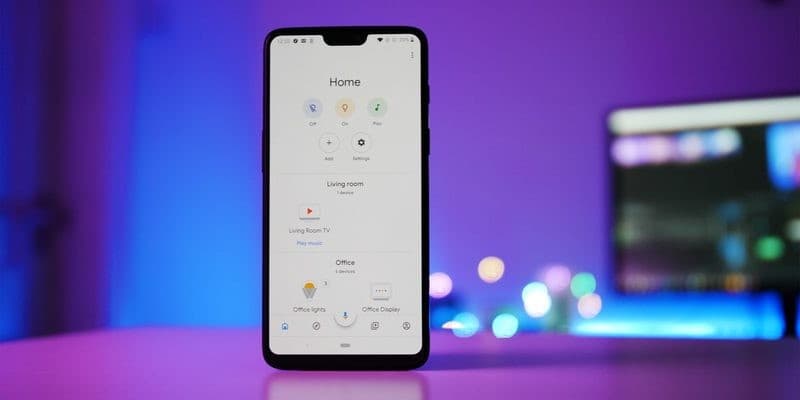
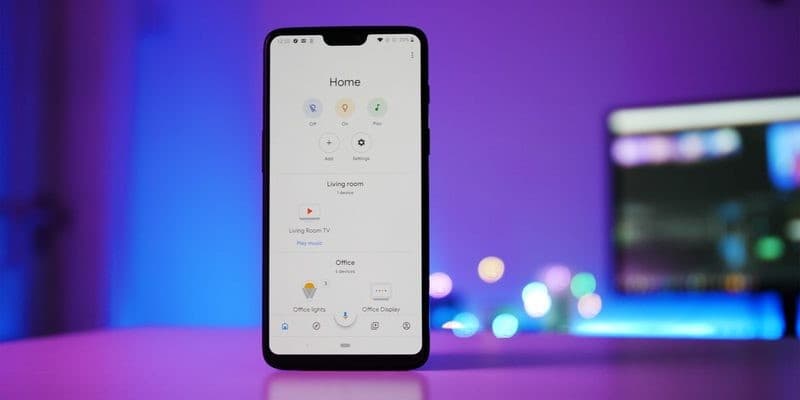
If you want to have all the appliances in your house under control, do it from the home tab. You can program the intensity of the lights according to whether or not you are watching a movie or playing music at any time you want. If you want to see what is the most important thing that is happening in your home, look at the "Feed" tab.
Any device that is playing audio or video can be controlled with Google Home. It doesn't matter where you are. Nothing will be far from you since you can modify the configuration from your mobile phone.
In the event that you are not present at home, you can configure alarms or activate notifications to find out about any event that you find relevant.
Among other advantages of using Google Home you will find that you can protect and organize your Wi-Fi network in the way you think is most convenient. You have the opportunity to accurately measure speed, manage which terminals access it, under what conditions, which have priority, activate adult controls and have a network for your guests to enter.
Among the variety of tips for using Google Home, the reality is that we can give you many. Especially since you have the possibility to configure the device in the way that you like the most. A good way to start the day is knowing the news and the weather conditions, well, for that, you just have to say Good Morning and the device will give you all the most relevant data.
In turn, if more than one person is going to use the device, you can configure the different voices to activate the device. You can do the same with the recognition of different languages. This option can even be used to practice a new language if you are learning another language.
The options you will have with this program are among the most varied that you can imagine. Set the temperature of the devices in your home, listen to music, program the operation of your appliances, find out if one is not working in the correct way, watch videos and many more.
It is no longer surprising that Google offers services of this quality. With Home, Nest and Chromecast you will find all the best services and the power of the internet giant's technology applied to your home.
While it may be difficult for some to set up settings at first, the service has many instructions available to help you get the most out of it. Enjoy being able to control absolutely everything with Google quality. Don't waste time on things that distract you and take care of your home with Google.
Ratings and reviews
3 Tricks for Google Home you didn't know
| Trick | Description |
|---|---|
1Create Custom Routines | Set up routines to trigger multiple actions with a single command. For example, 'Good morning' could turn on the lights, read the news, and start the coffee maker. |
2Find Your Phone | Say 'Hey Google, find my phone' and Google Home will ring your phone, even if it's on silent, as long as it's connected to your Google account. |
3Speak in Multiple Languages | Google Home can understand multiple languages simultaneously. Simply set up the additional languages in the settings, allowing you to converse with different family members in their preferred language. |
Direct competitor: Amazon Echo
A smart speaker that offers similar functionality to Google Home, including voice control, music playback, and smart home control.
| Feature |  Google Home Google Home | Amazon Echo |
|---|---|---|
| UI | Intuitive and user-friendly | Can be more complex, especially with many devices |
| Features | Excellent integration with Google services | Wider device compatibility |
| Performance | Reliable voice recognition and fast responses | Varies depending on the device and network |
| Price | Competitive price range | Similar price range with various models |
| Support | Extensive online help and community support | Good customer service and online resources |