
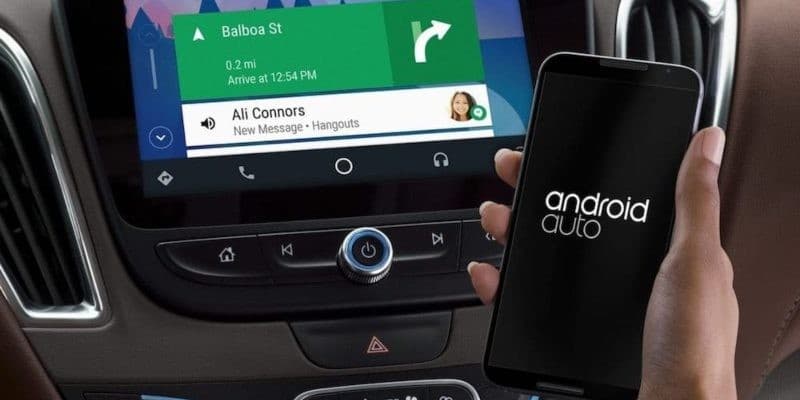
Android Auto
Google LLCUse all the applications you need while driving avoiding distractions · In-app purchases

Independent review site. Downloads redirect exclusively to official stores (Google Play, App Store) to protect user security.

Review by
Emily Carter
About this app
We all know that we should avoid using the mobile phone while driving, it is something that we already have assumed and is carried out by the vast majority of drivers in the world. But it is true that sometimes we need to turn to it to help us on our journeys, and this is where games and mobile applications come in to serve as a bridge and not need to focus our attention on mobile devices, since they solve the problems that we face. arise on the way.
More and more, the interface of these apps is designed to be more intuitive and does not require many steps if we need to use it while we are behind the wheel, just by putting an address it already shows us the way. There is even one that has improved to the point that you no longer need to enter this information in writing, you can say it with a voice message and have it answer you with the route to follow. All of this is what Android Auto does.
Developed by Google, it automatically adapts the screen of our phone so that you can use it from the car, quickly and easily. Its main objective is to reduce distractions at the wheel and thus avoid, as far as possible, any type of accident that we could have by combining the execution of these apps through voice actions. Download Android Auto for free, you find it available for Android devices.
One of the drawbacks of this application is that it is not available in all countries of the world, on the Google website you will find a list with all those in which you can use it and know all the technical requirements you need to have to be able to enjoy all its advantages.
Although it was launched in 2014, it is now when it has achieved all its popularity and entered the list of the most downloaded, the main claim that has made millions of users pay attention to it is that it allows access to other applications such as Google Maps or Spotify while we drive and for which you will only need to use our voice and Google Assistant.
In order to use it we will need to connect our mobile device to the car, either through a USB cable or with a wireless connection. This free application will require us to accept all the necessary permissions so that you can manage our phone without touching it, that is why the company already assures us that it is a totally safe app and that it will not collect any data that is not strictly necessary for its good functioning. Among those it will ask us are access to the phone, the contacts, the location, the calendar and the microphone. Once done, a very simple screen will appear in which you will only have to say an order and the Google assistant will get to work to please you.
The Android Auto application will automatically detect all the applications that you have installed on your mobile device and that are compatible, so it is recommended to start it before starting the trip so that you can select in advance the apps that you may need throughout your travel.
All the interaction you make with your car will be through your voice, Google Assistant will always give you an answer with which it will make it clear if it has understood you or not and that you know what is happening on your mobile at all times. One of the advantages of Android Auto is that you can also make and / or answer WhatsApp calls or messages. It is as simple as when a new message enters your device, click on Reply and dictate your response, it is transcribed and sent as text in the conversation.
To get the most out of Android Auto, it has a series of functions that if you know how to use them, you will make it your best ally behind the wheel. Among them you will find that you can have more than one car synchronized to this app. In its Connected Cars section, it will show you a list of all compatible vehicles in which you have used the application and you can manage them as you want, in this way you will not have to be creating new connections or eliminating those that already exist every time you change cars.
Ratings and reviews
Pros & Cons
Pros
- You can use your usual browser.
- You can send and receive WhatsApp.
- Correctly recognizes what is being asked of him.
- Most of the applications are supported.
Cons
- Sometimes it needs you to press a confirmation button.
- You need to connect it to the car.
- There are applications that do not work well.
- There are voice messages that you do not recognize well.
3 Tricks for Android Auto you didn't know
| Trick | Description |
|---|---|
1Activate voice commands hands-free | Simply say 'Hey Google' to activate voice commands without needing to touch anything. Make sure 'Hey Google' is enabled in your settings. |
2Manually add apps (if needed) | Sometimes apps don't automatically get added to Android Auto. Check the Android Auto settings on your phone to manually add or remove apps. |
3Quickly navigate using the status bar | The status bar lets you quickly access important features like navigation, calls and notifications. Swipe down to see them. |
Direct competitor: Apple CarPlay
A similar platform for integrating smartphones into car infotainment systems, developed by Apple.
| Feature |  Android Auto Android Auto | Apple CarPlay |
|---|---|---|
| UI | Customizable and intuitive | Simple but less customizable |
| Features | Google Assistant integration, broad app support | Siri integration, iOS-centric |
| Performance | Solid, depends on phone performance | Generally smooth, optimized for Apple devices |
| Price | Included with compatible Android phones and cars | Included with compatible iPhones and cars |
| Support | Wide support through Google and device manufacturers | Apple support and community |