

Independent review site. Downloads redirect exclusively to official stores (Google Play, App Store) to protect user security.

Review by
Sarah Bennett
About this app
The messages between people are no longer the same. Much changed since the first SMS that the old mobiles exchanged. In addition to the speed and the ability to send unlimited messages that messaging apps offer us, we are now adding new ways to express feelings. Among them we find icons, emojis, GIFs, and stickers. There are many free apps that allow us to enjoy a wide variety of designs and today we are going to bring you one of the best alternatives for you to install on your mobile.
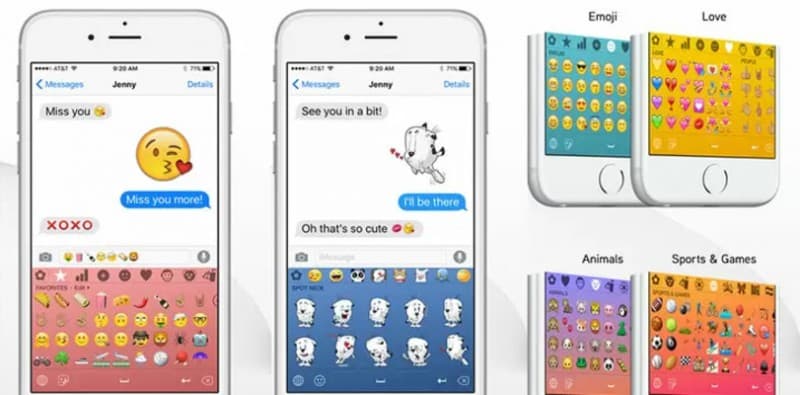
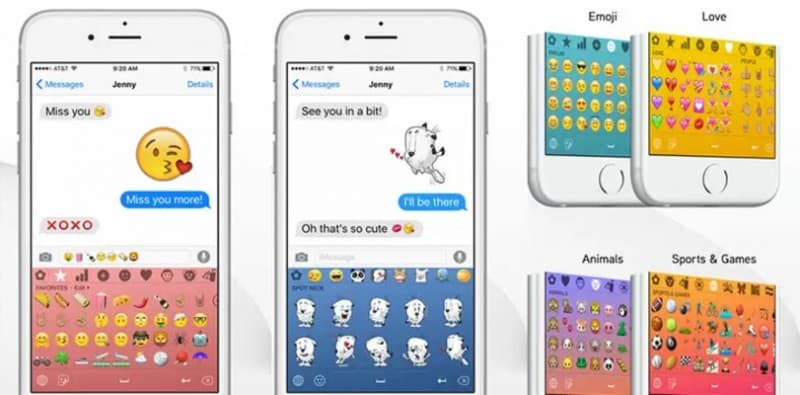
Emoji;) Keyboard is a program developed by the Kissapp firm and is undoubtedly one of the outstanding variants for you to add to your mobile configuration. It is one of the best free emoji keyboards.
Using Emoji;) will make all your conversations more fun, entertaining and cheerful. You will have at your disposal a wide variety of designs that exceeds 1,500 possibilities. This includes 3D options and animated emoticons. You also have the possibility to create your own emoji.
When you download Emoji;) for free, you will have an editor available in which you will have the chance to form your own emoji with the letters you want or change the colors of the default image designs. Enjoy the wide variety of fonts available.
In addition, many times we find programs that do not allow us to include emojis in all our communication channels. With the Kissapp product this will not happen to you since the keyboard is compatible and is available for you to use on all your favorite social networks.
You can install Emoji;) free of charge or activate your subscription to access the full features of this outstanding program. You will have more than 20 categories in which you can choose which image best represents your feelings at that moment.
Don't miss out on the possibility of making yourself one of the best, funniest and most original programs available today. Make all your conversations look nicer with Emoji;). Let your imagination fly and create new designs or take advantage of the vast offer that you have at your disposal in this great application.
Ratings and reviews
Pros & Cons
Pros
- Ability to edit icons
- Variety of options
- Fonts to change the font
- Works on social networks
Cons
- Some options are paid
- You have to change the original keyboard configuration
- It can run slow
- Lots of advertisements
3 Tricks for Emoji ;) you didn't know
| Trick | Description |
|---|---|
1Use Emojis as Shorthand | Instead of typing out long words, replace them with relevant emojis. 😉 can mean 'I'm winking'. |
2Combine Multiple Emojis for Complex Emotions | Experiment with combining different emojis to express more nuanced feelings. For example: 🤔+😉. |
3Use Emojis to Highlight Text | Use emojis like arrows or exclamation points to emphasize important information in your text. 👉Important! |
Direct competitor: Bitmoji
Bitmoji is an app that allows users to create personalized avatars and use them as emojis and stickers.
| Feature |  Emoji ;) Emoji ;) | Bitmoji |
|---|---|---|
| UI | Simple and user-friendly | More extensive, many customization options |
| Features | Emoji keyboard and suggestions | Avatar creation and sticker design |
| Performance | Fast and reliable | Can be slow when creating avatars |
| Price | Included in the operating system | Requires app download |
| Support | Standard emoji support | Avatar-specific support |